Travle Practice: Set Up and Replay Your Own Route
Open travle.earth/practice, choose a map and route, then select Play solo practice. To learn from a mistake, replay the same endpoints and change your guess order. We tested Ireland to Germany with United Kingdom and France.
Part of our complete Travle guide, with rules, worked examples and tips.
Open official Practice ↗Official site. dlewiki is an unofficial guide.
Set up an Ireland-to-Germany practice route
- Open official Practice & Challenge.
- Under Select map, choose Daily Game for the World map. Choose Great Britain for county practice.
- Open Select route. Set Start Country to Ireland and Target Country to Germany. A random option is also offered.
- Open Advanced Settings. For this example choose Normal and Unlimited Guesses, and leave Without going through empty.
- Choose Play solo practice. This starts a local attempt; you do not need to send anyone a challenge.
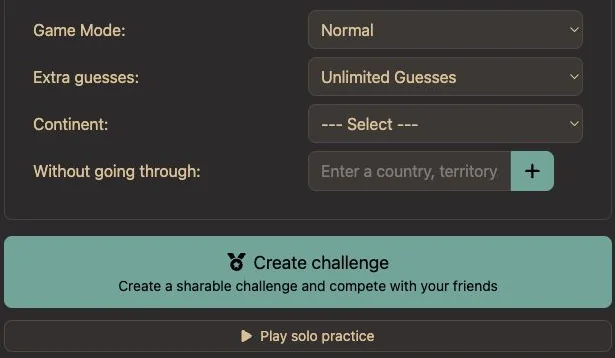
English-interface play-test on 2 October 2026. We started and finished this configuration in our existing browser session without a new sign-in or payment. This does not establish the access conditions for every account.
Complete the route in two guesses
The game supplies Ireland and Germany. Enter United Kingdom, press Guess, then enter France and press Guess again. Do not type the endpoints.
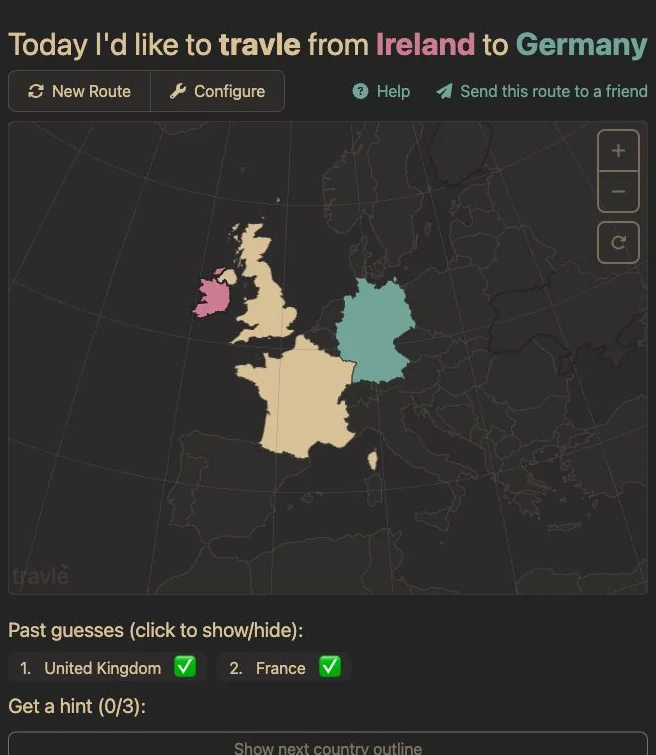
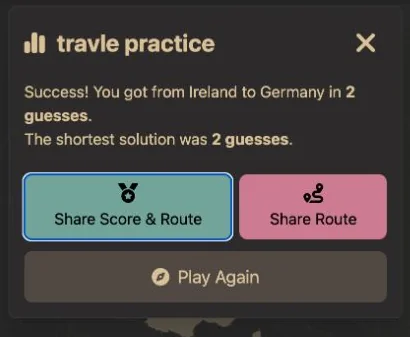
The route is Ireland → United Kingdom → France → Germany. Our attempt showed ✅ for both intermediate countries. The result reported 2 guesses and a shortest solution of 2 guesses. No hints were used.
Want to understand the water connections? The Ireland–UK explanation and Channel Tunnel guide explain each step.
Replay the same route and change one thing
After finishing, choose Play Again in the result dialog. In our test the endpoints stayed Ireland and Germany and the guess history reset. This is useful for comparing two attempts without changing the puzzle.
We replayed the route with France first, then United Kingdom. It still finished in two guesses, but France initially appeared gray on the map and received 🟩 rather than ✅. The gray-country comparison shows why.
Our Practice result dialog did not show a Perfect or +0 label. Use the displayed guess count and feedback when comparing Practice attempts; do not assume every Daily score label appears here.
What the advanced settings mean
| Control | How to use it |
|---|---|
| Game Mode | Normal or Hard Mode. Keep it unchanged when comparing two attempts. |
| Extra guesses | Default, None: Shortest route only, or Unlimited Guesses. This is a per-attempt allowance setting. |
| Continent | Narrows the route configuration. Available choices depend on the map. |
| Without going through | Adds excluded regions. Check the resulting instructions before guessing. |
| Create challenge | An alternative to solo practice for making a shareable challenge. We did not send a challenge in this test. |
We directly used the endpoints, Normal, Unlimited Guesses, solo play and Play Again above. The remaining settings were observed in the interface; their complete behaviour has not been tested here.
Practice, unlimited play or old daily puzzles?
- Learn a chosen route: use Practice and replay it.
- Understand “unlimited”: distinguish repeat play from Unlimited Guesses.
- Find a particular past daily puzzle: use the official archive entry guide, not a randomly generated route.
- Fix a refused or gray guess: use rules troubleshooting.